

Oscilloscope Based Software
SPMI Electrical Validation and Protocol Analysis Software
Model No: PGY-SPMI
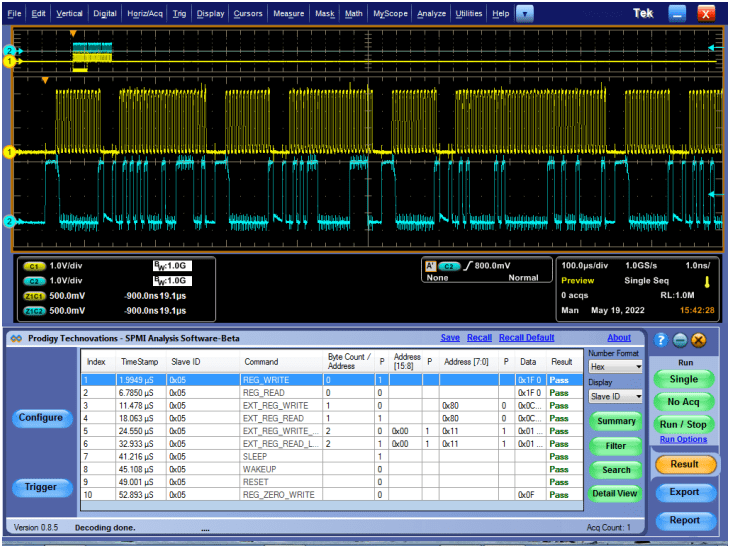
SPMI Electrical Validation and Protocol Decode Software offers electrical measurements compliance testing as specified in SPMI specification. PGY-SPMI Electrical validation and Protocol Decode software runs in Tektronix Oscilloscope provides electrical measurements and protocol decoding at click of button.
This software provides the flexibility to set reference levels for electrical measurement and customized limits makes it most versatile solution to meet different needs of characterizing SPMI Signals. Now design and test engineers can automatically make accurate and reliable electrical measurements and decode protocols in PGY-SPMI software using data acquired by Tektronix DPO5000, TDS7000, DPO/DSA/MSO7000, MSO5/6 series oscilloscope (Windows 7 or higher OS based scope only) to reduce the development and test cycle.
- SPMI
 Free Online Technical Support
 Free Software Updates
 Global Sales Support
 Evaluation Units Available
- Key features
- Specifications
- Software
- Technical Library
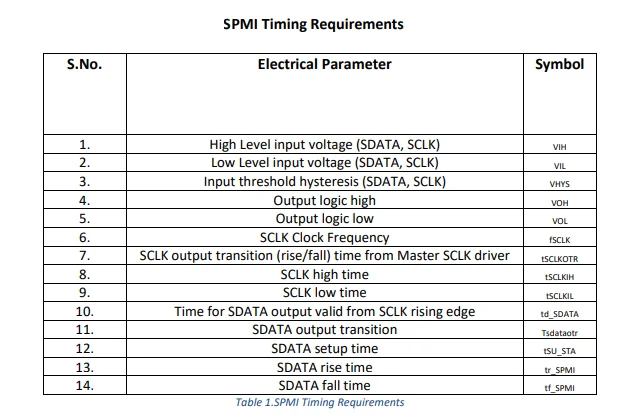
- SPMI Electrical Validation and Protocol Analysis using oscilloscope live channel data or stored SPMI signals (wfm (default), h5, trc format ( with option)).
- Links the content to the electrical signal in the oscilloscope for easy understanding of the electrical characteristics of the protocol.
- Displays the decoded data in SPMI frame format
- Error checks for parity bits of command and data
- Flexibility to view Slave ID in Symbol or Hex value
- Flexibility to view decoded data in hex, binary, Decimal or octal format
- Long-duration data decode support to capture more SPMI protocol transactions
- Search capabilities to locate protocol event
- Filter capabilities to view information of Interest
- Documentation by exporting data in CSV and TXT file format along with PDF Report Generation.
- API Support with Python.
Seamless Integration with Oscilloscope
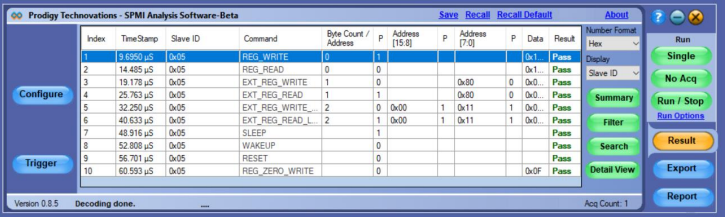
PGY-SPMI runs inside the Tektronix oscilloscopes and makes the electrical measurements, and displays the decoded data in a bus diagram, a table, and links the decoded data to the electrical signal in the bus diagram.
Detail View
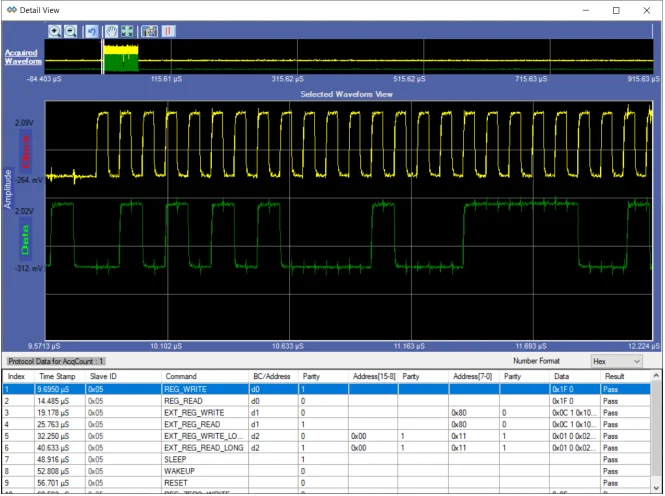
In Detail View, engineers can view the analog waveform and details of electrical measurements in a single view. If there is any failure in electrical measurement, designers can quickly correlate with the analog waveforms. Users can select any row in the detail view; the corresponding analog waveform will be zoomed in and displayed. In the same row, engineers can view all the electrical measurements corresponding to the selected row. Utility features such as Zoom, cursors, and markers make custom measurements while debugging.
Powerful SPMI Protocol Aware Hardware Based Real-Time Trigger
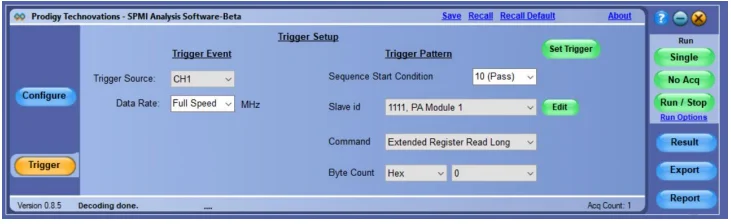
A simple, easy-to-use SPMI protocol-aware trigger feature allows engineers to capture SPMI signals at specific events in the SPMI interface.
Select any of the live channels Ch1 to CH4 as the trigger source and set the trigger pattern. The trigger can be set to full speed, half speed, or any custom data rate. SPMI provides the flexibility to select a combination of any one of the sixteen slave IDs, any command, and command-dependent parameters such as Byte count, Address, or Data.
Symbol table for Slave ID
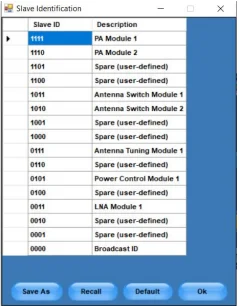
PGY-SPMI Software provides the flexibility to view the decoded data in the symbol table. SPMI specification documents provide guidelines to describe the Slave IDs. PGY-SPMI software has the default slave ID table. However, the user can edit the default table and apply the custom-described slave IDs for easy analysis of protocol activities.
Results Summary
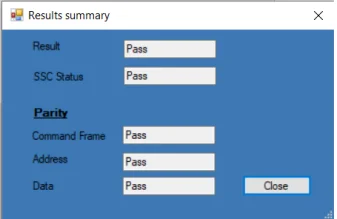
Protocol Summary provides a quick result view of protocol analysis of SPMI signals. This view lists pass/fail status of SSC, parity bit in command, address and data in the acquired data. This helps in locating the cause of SPMI Protocol packet failure.
Filter
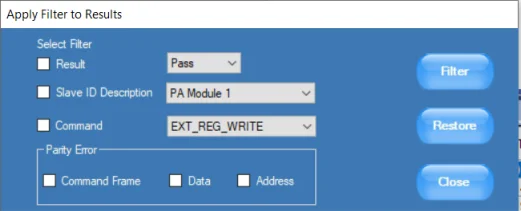
It is extremely challenging to view information of interest while there are hundreds of protocol transactions taking place between various devices. These problems compound during protocol analysis of a long record length. PGY-SPMI software solves this problem using the filter feature. By filtering information for Slave ID or specific command, or parity error type, the user can view only specific data of interest. Filters provide filtering of information using individual packet content or a combination of packet contents.
Search
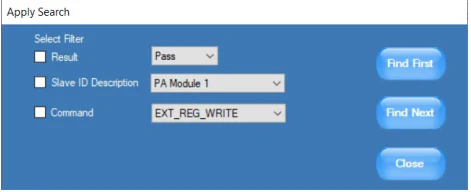
During protocol analysis, users tend to capture a large amount data capture any non-repeatable event. It is also extremely difficult locate the SPMI packet of interest. SPMI Software’s Search filter in is able to quickly locate the required Slave ID or command or Combination of both.
Reference Level Setup
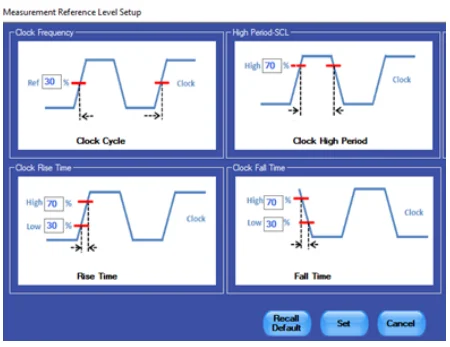
PGY-SPMI-EV is not just for standard electrical compliance testing, you can also vary the limits and test your device with custom limits. The intuitive limits and reference level setup allow you to configure the limits and reference levels for your custom testing needs. This enables you to test your device beyond the specification and characterize it.
Similar Products
-
 Protocol Exercisers & Analyzers
I3C Protocol Exerciser and Analyzer – Lite
The PGY-I3C Lite is a Protocol Analyzer…
-
 Protocol Exercisers & Analyzers
I3C USB Adapter
The PGY-I3C_USB_Adapter provides the ability to operate…
-
 Oscilloscope Based Software
10BaseT1S Protocol Decode Software
10BaseT1 is emerging as a key interface…